

TL;DR:
- Most AI agents in IT struggle with multi-step tasks and often fail to achieve high success rates.
- Effective deployment requires careful planning, human oversight, and redesigning workflows for AI compatibility.
- Current AI agents excel in narrow, structured tasks like automated remediation and log triage.
Most AI agents are sold as hands-free IT ops assistants. Set a goal, walk away, and let the agent handle the rest. Sounds great. But benchmarks show low success rates for AI agents in real IT environments, with some task categories sitting at 0% resolution. That gap between the pitch and the production reality is exactly what your leadership team needs to understand before committing budget and trust to these systems. This guide breaks down what AI agents actually are, where they genuinely help, where they break down, and how to deploy them without getting burned. No hype. Just clarity.
Table of Contents
- What is an AI agent? Definitions and core workflow
- Strengths and practical benefits for IT operations
- Limits, failure modes, and real-world benchmarks
- How to deploy AI agents safely: Best practices for IT/cloud teams
- The uncomfortable truth: Why most AI agents disappoint today and what might actually work
- Supercharge your IT ops with Argonix AI agents
- Frequently asked questions
Key Takeaways
| Point | Details |
|---|---|
| True agent workflow | AI agents execute, adapt, and reflect, going well beyond classic rule-based automation. |
| Real benefits exist | Productivity jumps and cost savings are real but require the right use cases and robust oversight. |
| Benchmark caution | Most AI agents struggle on complex IT benchmarks, needing close evaluation and human intervention. |
| Best practice deployment | Piloting and continuous monitoring are essential for safely integrating agents into IT operations. |
What is an AI agent? Definitions and core workflow
Let's start with the basics. An AI agent is an autonomous software entity that receives a goal, figures out how to pursue it, takes action using available tools, and adjusts based on what it learns along the way. That last part matters. A static automation script runs the same steps every time. An AI agent reflects, adapts, and tries again.
The AI agentic workflow follows a repeating loop: receive goal, acquire information, execute tasks, reflect on outcomes, and adapt the plan. In IT incident response, that might look like this:
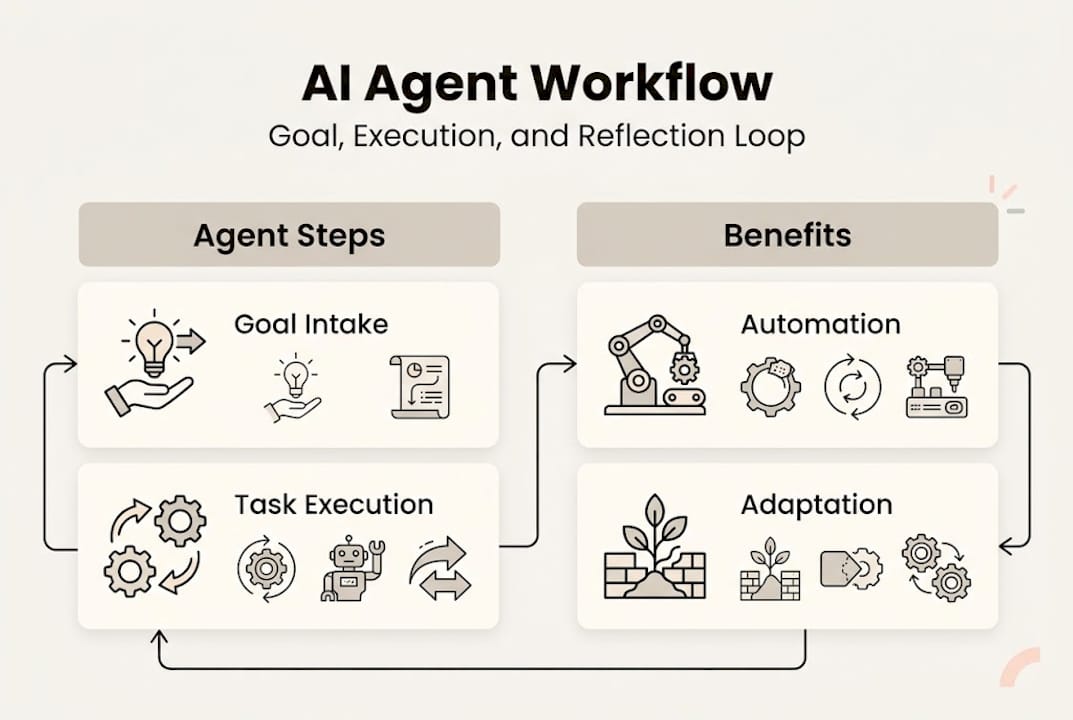
| Step | What the agent does |
|---|---|
| 🎯 Goal intake | Receives alert: "Service latency spike detected" |
| 📊 Context gathering | Pulls metrics, logs, recent deploys from connected tools |
| 📋 Planning | Identifies likely root cause candidates |
| 🔄 Execution | Runs diagnostic commands, queries Prometheus, checks Kubernetes pods |
| 🔍 Reflection | Evaluates results, rules out false leads |
| ⚡ Adaptation | Escalates or triggers remediation based on findings |
Common agent frameworks powering this loop include Chain-of-Thought (step-by-step reasoning), ReAct (reasoning plus action interleaved), and Plan-and-Execute (upfront planning, then sequential execution). Each has tradeoffs in speed, reliability, and cost.
Here's what often gets confused: not every chatbot or automation script qualifies as a true agent. True agents require temporal awareness (understanding context over time) and world grounding (knowing the current state of your environment). Most tools marketed as "AI agents" are really just LLM-powered wrappers around fixed workflows. Worth checking before you sign a contract.
For teams already exploring multi-cloud automation practices, understanding this distinction helps you evaluate what you're actually buying.
Pro Tip: Ask any vendor to show you how their agent handles an unexpected mid-task failure. A true agent recovers and adapts. A chatbot in disguise just stops or loops.
Strengths and practical benefits for IT operations
Once we understand how AI agents function at a foundational level, it helps to see where they are already adding measurable value.

The numbers from real deployments are compelling when agents are used in the right context. BCG reports up to 10x cost reduction in customer service operations and a 40% productivity boost in IT legacy modernization programs. Those aren't small wins.
For cloud and IT ops teams specifically, the strongest use cases right now include:
- 🔄 Automated remediation: Agents detect an anomaly, trace it to a misconfigured pod, and restart or reconfigure without waking anyone up at 2 a.m.
- 📊 Anomaly detection: Continuous pattern matching across metrics and logs, far faster than any human analyst can manage.
- 📋 Log triage: Agents filter noise from thousands of log lines and surface only what needs attention.
- 🎯 Synthetic testing: Proactive checks that simulate user behavior to catch degradation before real users feel it.
- ⚡ On-call augmentation: Agents handle the first 15 minutes of incident investigation, giving your SRE team a head start instead of a cold start.
The AI-powered incident response use case is particularly strong because the tasks are well-defined, the data sources are structured, and the cost of human delay is high. Agents thrive when the problem space is bounded.
That said, the investment is real. Integrating agents into production IT environments requires tooling, evaluation infrastructure, and ongoing tuning. Cloud monitoring automation can accelerate the ROI, but don't expect zero-cost deployment. Budget for the setup, not just the license.
Limits, failure modes, and real-world benchmarks
However, it's critical for IT leaders to temper benefit claims with a clear-eyed look at where agents tend to break down in practice.
The benchmark outcomes are sobering. ITBench, a rigorous evaluation framework for IT automation, found SRE task success rates at just 13.8%, CISO task success at 25.2%, and FinOps task success at 0%. These aren't edge cases. These are representative IT scenarios.
Why do agents fail? The most common failure modes include infinite loops, hallucinated actions, error propagation across steps, tool misuse, context overflow, long-horizon planning failures, and brittle handling of novel situations.
Here's a breakdown of where agents shine versus where they struggle:
| Scenario | Agent strength | Agent limitation |
|---|---|---|
| Routine alert triage | High | Low novelty tolerance |
| Multi-step root cause analysis | Moderate | Error compounds across steps |
| FinOps cost optimization | Low | Requires nuanced business context |
| Log pattern detection | High | Context window limits |
| Novel security incidents | Low | Hallucination risk is high |
The root causes of breakdown, ranked by frequency:
- Long-horizon planning failures: Agents lose coherence across many steps.
- Error propagation: One wrong tool call cascades into a chain of bad decisions.
- Context overflow: Too much data, not enough working memory.
- Hallucinated actions: The agent invents a solution that doesn't match reality.
- Brittle tool use: Minor API changes or unexpected outputs break the workflow entirely.
"The gap isn't in the model's intelligence. It's in the agent's ability to commit to a plan and stay grounded in the real state of your environment." This is what researchers call the 'planning Rubicon,' and most commercial agents haven't crossed it yet.
Understanding AI agent monitoring limits is essential before you hand over mission-critical workflows. And reviewing DevOps automation pros and cons helps frame where agents fit within a broader automation strategy.
How to deploy AI agents safely: Best practices for IT/cloud teams
Given the current limits, deploying AI agents requires a careful, best-practice-driven approach for IT and cloud leaders.
The biggest mistake we see? Teams bolt agents onto existing legacy processes and expect magic. That's not how this works. Agents need workflows that are designed for them, not retrofitted around them. Most agents fail because they're dropped into environments with unclear goals, ambiguous tool interfaces, and no error recovery design.
Here's a practical deployment sequence for IT and cloud teams:
- Pilot in sandboxes first. Never start in production. Use a staging environment that mirrors real workloads and measure success rates against your own benchmarks, not the vendor's.
- Define success metrics upfront. Track hallucination rates, error propagation frequency, and task completion rates. If the vendor can't give you these numbers, that's a red flag.
- Mandate human-in-loop for high-stakes tasks. Automated remediation on a dev cluster? Fine. Auto-scaling a production database during peak traffic? Keep a human in the approval chain.
- Redesign workflows for agent compatibility. Break complex processes into smaller, well-defined subtasks. Agents perform far better on bounded problems with clear success criteria.
- Review outcomes continuously. Set a weekly review cadence for the first 90 days. Agents drift. Environments change. What worked last month may not work today.
For agent-driven automated remediation to deliver real value, your runbooks need to be clean, your tooling interfaces need to be stable, and your team needs to stay engaged. Use the automation evaluation guide to structure your assessment before committing to a platform.
Pro Tip: Redesign your incident runbooks before deploying agents, not after. Agents trained on messy, ambiguous runbooks produce messy, ambiguous actions.
The uncomfortable truth: Why most AI agents disappoint today and what might actually work
All this raises an uncomfortable but crucial question for IT leaders: Are most AI agents ready for your stack, or is reality far behind the hype?
Our honest take? Most aren't. Not yet.
The industry noise around AI agents largely skips over a fundamental problem: most agents fail to cross the 'planning Rubicon,' staying expensive chatbots rather than truly autonomous systems. They can answer questions. They can trigger predefined actions. But commit to a multi-step plan in a live, changing environment? That's where most fall apart.
What actually works right now is narrower than the marketing suggests. Agents succeed when the domain is specific, the tools are stable, and human oversight is built into the loop. Not as a fallback. As a feature.
The next 12 to 18 months will likely bring meaningful improvements in long-horizon planning and error recovery. But the teams winning with agents today aren't chasing raw autonomy. They're investing in workflow readiness, robust evaluation pipelines, and human alignment. That's the real edge. For real-world incident response lessons, the pattern is consistent: structured environments plus human oversight equals actual results.
Supercharge your IT ops with Argonix AI agents
For IT leaders ready to harness what agents do best within realistic constraints, practical solutions exist.
Argonix delivers production-ready AI agents built specifically for complex IT environments. Not chatbots dressed up as agents. Actual agentic workflows with root cause analysis, auto-remediation, and over 40 connectors across your cloud stack, observability tools, and communication platforms. 😊
Want to see how AI incident response works in a real multi-cloud environment? Or explore how infrastructure monitoring with AI agents can cut your mean time to resolution? Argonix is built for teams that need results, not demos. Let's make your operations smarter, safer, and genuinely more autonomous.
Frequently asked questions
What is the difference between AI agents and traditional automation?
AI agents are autonomous software entities that can plan, adapt, and execute tasks based on changing goals, while traditional automation follows fixed rules without context awareness. The agentic workflow requires dynamic reflection and adaptation that rule-based systems simply can't perform.
Why do most AI agents fail in complex IT operations?
Most AI agents struggle with multi-step tasks, error propagation, and handling novel situations. Benchmarks show agents resolve only a subset of IT scenarios reliably, with some categories like FinOps sitting at 0% success.
How can organizations safely integrate AI agents into IT workflows?
Start with pilot projects in sandboxes, involve human oversight on high-stakes tasks, and continuously review agent performance. Human-in-the-loop and robust evaluation methods are the most reliable path to safe integration.
What are the most impactful use cases for AI agents today?
AI agents deliver the strongest results in automated remediation, log triage, and anomaly detection for cloud infrastructure. Measurable value is most consistent when the problem domain is well-defined and the tooling is stable.
#AIAgents #CloudOps #ITAutomation #SRE #DevOps #Argonix
Recommended
- Argonix | AI Ops Copilot - Monitoring, Incident Response & Infrastructure Automation
- Why choose a DevOps platform: AI automation efficiency
- Automation best practices for efficient multi-cloud ops
- Argonix | AI Ops Copilot - Monitoring, Incident Response & Infrastructure Automation
- AI roleplay for confident job interviews: benefits and limits | Pavone Academy