

TL;DR:
- Connectors are purpose-built, low-maintenance tools that enable seamless multi-system integrations.
- They automate authentication, data transformation, error handling, and support real-time and bidirectional workflows.
- Effective use of connectors improves automation reliability, reduces manual effort, and requires careful management to prevent sprawl.
Most IT leaders think automation means writing scripts, wiring APIs, and hoping nothing breaks at 2 a.m. But the real force multiplier? Connectors. They're the layer between your tools and your intentions, turning manual, error-prone workflows into orchestrated, self-running operations. Yet connectors remain underappreciated in most enterprise automation conversations. We're going to change that. This article breaks down exactly what connectors are, how they work under the hood, where they deliver the most impact across multi-cloud and DevOps environments, and how to choose and manage them without creating a tangled mess of tech debt.
Table of Contents
- What are connectors in IT automation?
- How connectors work: Mechanics and architecture
- Connectors in action: Multi-cloud and DevOps automation use cases
- Limitations and edge cases: Custom connectors, legacy support, and risks
- Choosing and managing connectors: Best practices for enterprise automation
- A candid perspective: Connectors aren't a silver bullet—here's what really matters
- Supercharge your IT automation with Argonix
- Frequently asked questions
Key Takeaways
| Point | Details |
|---|---|
| Connectors streamline automation | They bridge systems, reduce custom code, and speed up IT integrations. |
| Real-world impact in multi-cloud | Connectors enable orchestration across platforms like AWS, Azure, and GCP, driving operational efficiency. |
| Plan for limitations and risks | Custom solutions and governance are vital to manage edge cases, AI complexities, and tech debt. |
| Best practices safeguard scalability | Choosing modular, AI-ready connectors ensures sustainable automation growth. |
What are connectors in IT automation?
Let's clear up a common misconception first. Connectors are not the same as raw APIs or custom adapters. They're a step above.
Pre-built integrations act as purpose-built bridges that enable seamless communication between disparate systems, applications, and services without custom coding. Think of them as on-ramps to a data highway. You don't build the road. You just get on it.
Here's a quick comparison to make this concrete:
| Feature | Raw API | Custom adapter | Connector |
|---|---|---|---|
| Setup time | High | Very high | Low |
| Auth handling | Manual | Manual | Built-in (OAuth) |
| Error handling | DIY | DIY | Pre-configured |
| Data normalization | Manual | Partial | Automatic |
| Maintenance burden | High | Very high | Low |
The difference matters at scale. When your ops team manages dozens of tools across AWS, Azure, GCP, Kubernetes, Datadog, PagerDuty, and Slack, writing custom glue code for each integration is a nightmare. Connectors eliminate that.
Modern platforms offer libraries of over 1,000 connectors. That's 1,000 integrations your team doesn't have to build from scratch. The real magic is in what connectors handle automatically:
- Authentication: OAuth, API keys, SSO tokens managed without manual intervention
- Error handling: Retry logic, fallback paths, and alerting baked in
- Scheduling: Trigger-based or time-based execution without cron job chaos
- Data normalization: Field mapping and format conversion handled automatically
"Connectors handle authentication, data formatting, and error management far beyond what raw APIs offer out of the box, dramatically cutting development and maintenance time."
For DevOps platform automation, this means your engineers spend time building features, not maintaining integration plumbing. That's the real value proposition.

Connectors also provide a layer of abstraction. When an upstream API changes, a well-maintained connector absorbs that change. Your workflows keep running. Without connectors, every API update becomes a fire drill.
How connectors work: Mechanics and architecture
Now that connectors' basic definition is clear, digging into their inner workings shows just how much power they add to automation architecture.
Every connector follows a predictable lifecycle. Understanding it helps you design better workflows and troubleshoot faster.
The connector lifecycle:
- Authentication: The connector establishes a secure session using OAuth, API keys, or certificates. No manual token management required.
- Extraction: Data or events are pulled from the source system based on a trigger or schedule.
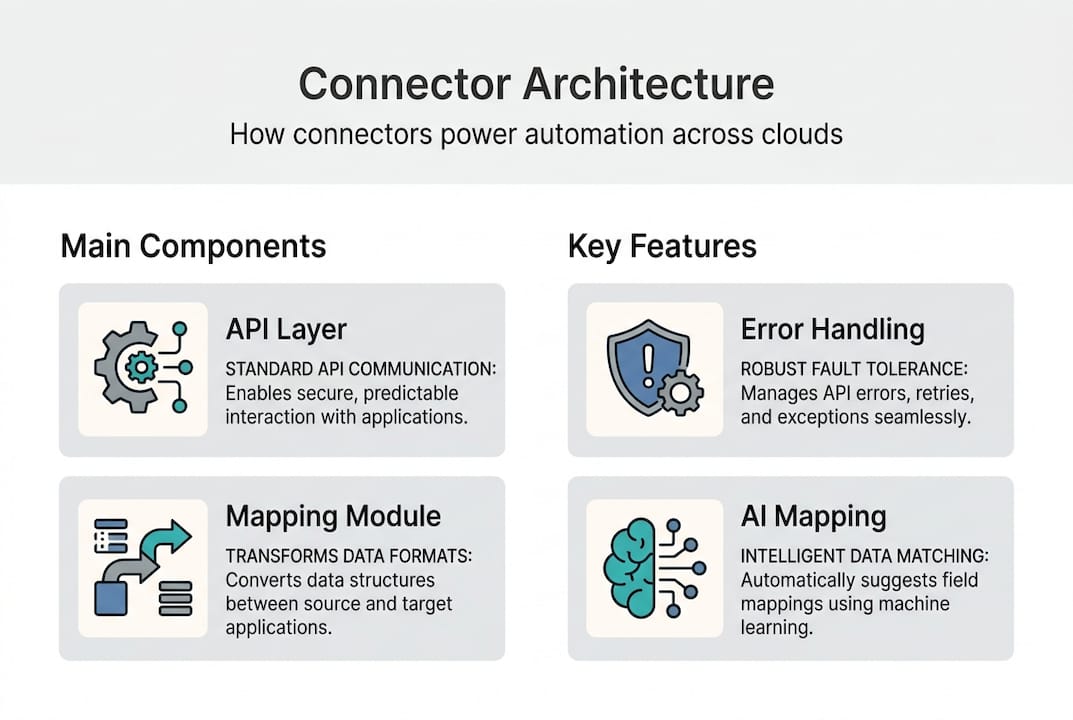
- Transformation and mapping: Fields are mapped, formats are converted, and data is normalized to match the target system's schema. This is where connector schema mapping does the heavy lifting.
- Loading: Transformed data is pushed to the destination, whether that's a database, a monitoring platform, or a ticketing system.
- Confirmation and error handling: The connector verifies success, logs the result, and triggers retry logic or alerts if something goes wrong.
Connectors also support multiple operational modes. Batch, real-time, and bi-directional capabilities give you flexibility depending on the use case. Batch mode works great for nightly compliance reports. Real-time mode is essential for incident detection. Bi-directional sync keeps your CMDB and cloud inventory aligned.
Here's a quick breakdown of connector action types:
| Action type | Direction | Example |
|---|---|---|
| Trigger | Inbound | Alert fires when CPU > 90% |
| Action | Outbound | Create Jira ticket automatically |
| Sync | Bi-directional | CMDB updates reflected in cloud tags |
| Poll | Inbound | Check for new events every 60 seconds |
AI is also changing connector architecture. Modern connectors now include intelligent field mapping, anomaly detection during data transfer, and self-healing logic that predicts and corrects errors before they cascade. For AI-driven cloud monitoring, this means fewer false positives and faster root cause identification.
Pro Tip: Choose connectors that support schema evolution and self-healing. When upstream APIs change their data structure, a connector with schema evolution support adapts automatically instead of breaking your entire pipeline.
Connectors in action: Multi-cloud and DevOps automation use cases
Beyond the technical process, the real impact emerges in everyday IT and DevOps use cases.
Connectors are where automation theory meets operational reality. Here are the scenarios where they deliver the most value:
- 🔄 Cloud orchestration: Connectors link AWS Lambda, Azure Functions, and GCP Pub/Sub into unified workflows. One event in AWS can trigger a response in GCP without any custom code.
- 🛠️ Infrastructure patching: Automated patching workflows using connectors have been used to manage 62,000 VMs at scale, eliminating the manual overhead that typically slows patch cycles.
- 🚀 CI/CD pipeline integration: Connectors tie Jenkins, GitHub Actions, and ArgoCD together. A code commit triggers a build, which triggers a deployment, which triggers a monitoring check. All automatic.
- 📋 IaC orchestration: Connectors integrate Terraform and Kubernetes CRDs into event-driven workflows, so infrastructure changes happen in response to real conditions, not just scheduled jobs.
- 🔔 Incident response: Connectors between monitoring tools and communication platforms mean your ops team gets alerted in Slack the moment a threshold is breached, with context already attached.
The numbers back this up. Teams using connector-driven automation report 70% of manual remediation tasks automated, cutting hours of toil per engineer per week. That's not a marginal gain. That's a structural shift in how your team operates.
For multi-cloud automation best practices, connectors eliminate the "swivel chair" problem where engineers jump between five consoles to complete one task. One workflow, one trigger, one outcome.
Pro Tip: Use connectors to unify your monitoring and incident response pipeline. When your observability stack, ticketing system, and communication tools all talk to each other automatically, you miss fewer incidents and respond faster. Explore GitOps for orchestration to see how this plays out in practice.
The ROI is real. Fewer context switches, fewer missed alerts, fewer manual errors. Connectors don't just save time. They improve reliability.
Limitations and edge cases: Custom connectors, legacy support, and risks
Of course, not all connectors and scenarios are smooth sailing. Spotting the limitations is critical for sustainable automation.
Connectors are powerful, but they're not magic. Here's where things get complicated:
Legacy system integration is the most common pain point. Pre-built connectors exist for modern SaaS tools and cloud platforms. But your 15-year-old ERP system? Probably not covered. Custom connectors for legacy systems and RPA scenarios are common when pre-built options don't exist. Building them takes time and expertise, and they require ongoing maintenance.
AI/ML connector risks deserve special attention. Connectors that feed data into ML pipelines can introduce bias if the data normalization logic isn't carefully designed. Model drift is another concern. If the data flowing through your connectors changes in structure or volume, your models can degrade without obvious warning signs.
Here are the top risks and how to mitigate them:
- ⚠️ Schema drift: Upstream APIs change their data structure. Mitigation: Use connectors with schema evolution support.
- 🚦 Rate limiting: High-volume workflows hit API rate limits. Mitigation: Build throttling and backoff logic into your connector configuration.
- 🔁 Transient failures: Network blips cause connector timeouts. Mitigation: Configure retry policies and dead-letter queues.
- 🤖 AI/ML bias: Poor data normalization skews model outputs. Mitigation: Audit connector transformation logic regularly.
- 🏗️ Integration sprawl: Too many connectors create operational drift and hidden dependencies. Mitigation: Maintain a connector inventory and deprecate unused integrations.
"Self-healing connectors and modular scaling are not nice-to-haves. For enterprises running hundreds of automated workflows, they're the difference between a resilient system and a fragile one."
For infrastructure monitoring tips, the lesson is clear. Don't assume a connector works perfectly once deployed. Monitor connector health the same way you monitor your applications.
Choosing and managing connectors: Best practices for enterprise automation
With those edge cases in mind, how do you actually choose and manage the right connectors for your enterprise?
Here's a practical framework we've seen work well for IT teams managing complex, multi-cloud environments:
- Assess your integration landscape first. Map every tool, platform, and data source your team relies on. Identify where manual handoffs exist. Those are your connector opportunities.
- Prioritize scalability and governance. A connector that works for 10 workflows needs to handle 500 without degrading. Check for rate limit handling, audit logging, and role-based access controls before committing.
- Evaluate AI enhancement support. Scalable, AI-enhanced connectors with strong governance frameworks deliver better long-term ROI than basic integrations. Look for intelligent mapping, anomaly detection, and self-healing capabilities.
- Plan your upgrade path. Connectors tied to a single vendor's ecosystem can become liabilities. Favor connectors built on open standards or modular SDKs that evolve with the ecosystem.
- Benchmark ROI continuously. Track hours saved, error rates reduced, and incidents resolved faster. Use the connector selection guide to structure your evaluation criteria before you buy.
Pro Tip: Prioritize connectors with modular, reusable SDKs. They let you extend functionality without rebuilding from scratch, which future-proofs your automation investment as your stack evolves.
Managing connectors in hybrid environments adds another layer. On-premises systems, private clouds, and public clouds all have different latency, security, and compliance requirements. Your connector strategy needs to account for all three. Review your automation best practices regularly as your infrastructure grows.
Connector lifecycle management is also underrated. Audit your active connectors quarterly. Retire unused ones. Update credentials before they expire. Treat connectors like infrastructure, because that's exactly what they are.
A candid perspective: Connectors aren't a silver bullet—here's what really matters
Years spent optimizing IT automation at scale teach you one uncomfortable truth: connectors reduce heavy lifting, but unchecked connector sprawl creates its own form of tech debt. We've seen enterprises with hundreds of active connectors and no one who fully understands the dependency graph. That's not automation. That's a different kind of chaos.
The teams that get the most out of connectors don't just pick the best tools. They invest in process design, change management, and cross-team communication first. Automation amplifies whatever process you have. If the process is broken, the connector just breaks it faster.
Our hard-won lesson: measure outcomes, not automation stats. The number of connectors deployed is a vanity metric. The number of incidents resolved without human intervention is not. Simplify before you scale. Align your connector strategy with choosing the right DevOps strategies for your organization's actual goals. Connectors are a means to an end, not the destination.
Supercharge your IT automation with Argonix
If you're ready to level up your connector strategy with a trusted automation partner, here's how Argonix can help.
Argonix is built around the idea that connectors should work for you, not require a team to babysit them. With over 40 pre-built connectors across cloud providers, observability tools, CI/CD pipelines, and communication platforms, Argonix gives your ops team a unified automation layer that actually scales.
From AI-powered infrastructure monitoring to AI-driven incident response, Argonix connects your entire operational stack, automates root cause analysis, and triggers remediation workflows before your team even gets paged. Less noise. Faster resolution. More control. Explore what connector-driven automation looks like when it's done right.
Frequently asked questions
What makes connectors better than direct API integrations for IT automation?
Connectors handle authentication, data formatting, and error management out of the box, greatly reducing manual coding and operational risk compared to raw API integrations.
Can connectors be customized for legacy or proprietary systems?
Yes, custom connectors for legacy and RPA scenarios are common when pre-built integration options don't exist for your specific system.
What risks should I consider when automating with connectors?
Key risks include schema drift, transient failures, rate limits, and, for AI connectors, potential for bias or model drift over time.
Do connectors support both batch and real-time operations?
Many connectors support batch or real-time modes with bi-directional capabilities, giving you flexibility for both scheduled loads and live event-driven workflows.
How do I choose the right connector for my enterprise automation needs?
Evaluate based on scalability, governance support, modularity, and AI-enhanced connector compatibility with your existing platforms and long-term automation roadmap.